Captions, Subtitles and Dubbed Audio: What Each Option Does
Captions, subtitles and dubbed audio solve different viewing problems. Learn how to choose a track for clearer dialogue, language practice or original performances.
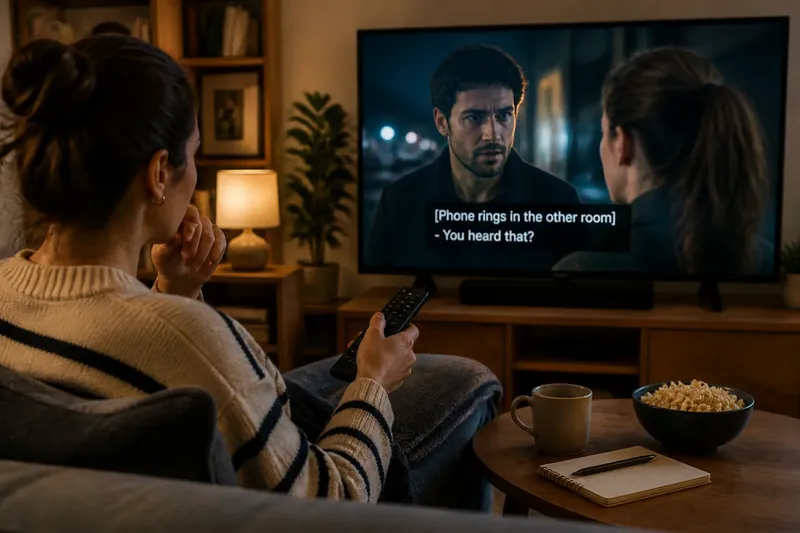
The kettle clicks just as a character murmurs a name, and the next line makes little sense without it. Captions, subtitles and dubbed audio can each help, but they carry different information. Knowing what a track does makes it easier to choose one for the room, the language and the scene.
Track differences
Captions represent dialogue and may also describe meaningful sounds, speakers or vocal qualities. A caption track might identify a phone ringing, a door slamming or a line delivered in a whisper. Those details can help when audio is unavailable, difficult to follow or not the focus of the room.
Subtitles usually render dialogue in written form, often translating speech from another language. They may omit sound descriptions and speaker labels, though conventions vary by service and programme. If you understand the original audio but not its language, translated subtitles can make the dialogue accessible.
Dubbed audio replaces or overlays the original spoken performances with a recording in another language. It lets viewers follow dialogue without reading continuously, but voices, timing and performance choices differ from the original track. A dub is an audio option, not a kind of subtitle.
These labels are useful, but they do not always tell you exactly what a particular menu item contains. If a track’s role is unclear, try a short scene and check whether it describes sounds, translates dialogue or changes the spoken language. For service-specific details, consult the track description or the provider’s guidance.
Room and attention
Start with the obstacle you want to remove. In a quiet room with clear sound, translated subtitles may be enough for a foreign-language programme. If the room is noisy, captions can help you catch lines even when the audio is in a familiar language. If reading small text is tiring or your attention needs to stay on the image, dubbed audio may feel more comfortable.
Captions can carry information that dialogue-only subtitles omit. A cue such as “music swells” may clarify why a character reacts before anyone speaks; a speaker label can distinguish overlapping voices. But extra text can crowd the picture, especially during fast dialogue or scenes already dense with signs and visual clues.
Say you are watching a Spanish mystery in a living room where a fan makes quiet dialogue hard to hear. You select English dubbed audio and English captions, then notice the captions follow the translated performance rather than the Spanish dialogue. That combination makes the scene easier to follow in the noisy room; switching to Spanish audio with English subtitles later preserves the original voices instead.
The short trial is more useful than deciding from a track name alone. A service may offer captions in the spoken language, translated subtitles or both, and one programme may offer fewer choices than another. The best pairing can change with the room, the scene and your reason for watching.
Language practice
For a story in a language you are learning, different combinations direct your attention in different ways:
- Original audio with subtitles in a familiar language: keeps the original voices while making the plot easier to follow.
- Original audio with same-language captions: connects spoken words with written text and can help with unfamiliar names or quick exchanges.
- Dubbed audio with subtitles in the same language: lets you listen in that language while keeping written dialogue available, though the wording may not match the spoken version.
- Original audio without text: leaves more attention for listening, but a complicated scene may be harder to track.
There is no single best setting for language practice. A beginner may prefer familiar-language subtitles to keep the plot legible; someone comfortable with the dialogue may choose same-language captions to notice phrasing. Switching tracks between scenes is a reasonable adjustment, not a failure to keep up.
Subtitles are often edited for reading speed and screen space. They may condense a line, while a dub may reshape it to fit spoken delivery or the target language. Neither should be treated as a word-for-word transcript of the original performance.
Readable screen text
Text settings affect how easily you can follow a track. If the player offers controls, try a clear typeface, a size that remains legible from your usual seat and a background or outline that separates letters from bright scenes. Larger text can help, but it may cover faces, signs or other visual details, so adjust it for the screen you are using.
Placement and contrast matter too. Pale text can disappear against snow, daylight or a white shirt; a subtle dark backing may make it easier to read. Some players let you change these settings on the viewing device, while others use an account or system setting. If text looks crowded, check for a different size or style before abandoning a useful track.
Consider whether sound cues add meaning in the scene at hand. A quiet drama may rely on a soft knock or distant announcement, while a dialogue-heavy comedy may feel cluttered with extensive sound descriptions. Captions should make relevant information easier to access, not turn every frame into a wall of text.
Common track questions?
Are captions and subtitles the same?
They can overlap, but captions may include sound descriptions and speaker identification, while subtitles commonly focus on dialogue or translation. Menu labels are not always consistent, so a short preview can show what a track actually contains.
Can I use subtitles with dubbed audio?
Often, yes, though the subtitle wording may not match the dub exactly. One track may translate the original dialogue while the other adapts it for spoken delivery, so treat them as parallel versions rather than synchronized text.
Which option keeps the original performances?
Choose the original-language audio, then add subtitles or captions in a language you can read. A dub changes the spoken performances, even when the translated dialogue conveys the same basic scene.
Why do captions describe sounds?
Sound descriptions can supply information beyond spoken words, such as who is speaking or whether a sound is a ring, a knock or music. They can help when audio cues are hard to hear, but a dialogue-focused track may suit you better if extra text distracts you.
Simple track choices
Use these checks when a menu offers several tracks. Each observation points to a practical next choice rather than a permanent setting.
- Check the spoken language. If it is the language you want to hear, choose original audio; otherwise, choose a dub if one is available, or translated subtitles if you want to keep the original voices.
- Check whether you can follow dialogue without reading. If not, try dubbed audio; otherwise, keep the original audio and add subtitles only if they help with language or plot.
- Check the room noise. If it masks speech, try captions or a dub; if the room is quiet and the speech is clear, use subtitles or no text according to your language needs.
- Check what the text describes. If it identifies sounds or speakers you need, keep captions; if those details clutter the scene, try a dialogue-focused subtitle track.
- Check text legibility from your seat. If letters blur into the image, adjust size, outline or background; if the text remains readable but covers important details, try a smaller size or different placement.
- Check whether you want the original performances. If preserving the original voices matters, select the original audio with subtitles; if reading pulls your attention away, try a dub and accept that the performances will sound different.
Imagine you start a French mystery with French audio, English subtitles and a dialogue-heavy scene. You notice that the translation helps with the plot, but a fast exchange is still hard to follow; you switch to French captions for that scene and find the written dialogue easier to connect to the voices. When captions cover a clue printed on a sign, you return to English subtitles. The resulting choice is scene-specific: captions for the quick exchange, subtitles for the visual clue, and original audio throughout.
What to skip
It is not worth pausing repeatedly to make every subtitle line match every spoken word. Translation, timing and performance shape the tracks, and close comparison can pull attention away from the scene. Choose for the kind of viewing you want, then change the setting only when a practical problem appears: unreadable text, missed dialogue, distracting sound descriptions or a dub that makes the performance harder to enjoy.
For captions, subtitles and dubbed audio, ask whether you need help hearing, understanding the language or following the original performance. Keep the track menu handy, but do not treat one setting as the correct choice for every room or scene. A small adjustment when a real obstacle appears is usually more useful than endless tweaking.