Why the Same Programme Appears in Several Rows
Why the same programme appears in several rows: understand catalogue collections and interface placement so you can tell why a title keeps resurfacing.
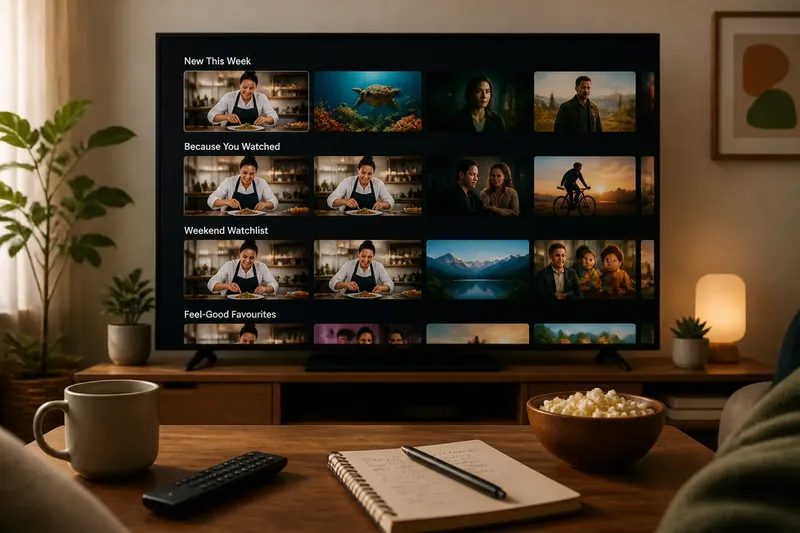
You spot the same cooking competition in “New This Week,” “Because You Watched,” and a row devoted to weekend viewing. The artwork is familiar; the programme has not changed. In a streaming catalogue, the same programme appears in several rows because each row can be a different route to the same title.
Those routes have different purposes. A row may group titles by subject, viewing context, recent arrival, or a recommendation system’s interpretation of your activity. Knowing how the rows work makes it easier to browse without mistaking a repeated tile for a new episode or a different edition.
Why does a title appear in multiple rows?
A catalogue can place one programme in several collections at once. A nature series might belong to “Documentaries,” “Wildlife,” and “Short Episodes.” Those collections describe overlapping aspects of the same programme, so the catalogue can surface it wherever a reader might look for one of them.
The interface then displays selected collections as rows. One row could reflect a genre, another a temporary editorial grouping, and another a personalized recommendation. The programme’s presence in several rows is not evidence that it has been duplicated in the underlying catalogue; it may simply have several discovery labels.
Rows also serve different browsing intentions. Someone looking for a comedy may enter through a genre row, while someone choosing something brief may find the same title under a time-oriented collection. The interface offers multiple entrances rather than asking every viewer to follow a single path.
What does each row label mean?
Read a row label as a clue about why the catalogue is showing a title, not as a complete description of the programme. Some labels are straightforward categories, such as “Crime Series.” Others signal timing or context, such as “Recently Added” or “For a Quiet Evening.” A recommendation row may refer to your account’s activity or to a broader editorial choice.
Labels can be broad, playful, or tailored to the service’s own catalogue. “Award-Winning” might group works by a particular kind of recognition; “Hidden Gems” is more a curatorial pitch than a precise classification. If the wording is vague, open the title details rather than assuming the row has a strict definition.
The label may also describe the collection, not every detail of every item in it. A programme in “Family Picks,” for instance, is being presented in that browsing context; the label alone does not replace its synopsis, rating information, or other title details.
Are repeated rows separate versions?
Usually, a repeated tile is the same programme shown in different collections, but it is sensible to check the title page if anything looks different. Streaming services can offer separate seasons, specials, language versions, or editions under related names. Those are catalogue distinctions, not consequences of the programme appearing in several rows.
Compare the displayed title, season or episode information, and synopsis. If the tile opens the same title page each time, the rows are acting as different routes to one listing. If it opens a separate entry, the service may be treating that item as a distinct part of the catalogue.
Artwork can add to the confusion. A service may use different promotional images in different contexts, and a row’s crop or layout can make the same image appear unlike itself. Look for the title and details before deciding that a new image means a new programme.
How do editorial and personalized rows differ?
An editorial row is assembled around a theme selected by the service, such as a seasonal collection or a set of recent arrivals. A personalized row is shaped at least partly by signals associated with an account, such as titles watched or saved. Some rows combine both approaches: the service chooses a collection, then decides which items to bring forward for a particular viewer.
The label and the pattern of titles offer practical hints, though they do not reveal every rule behind placement. A row named for a holiday or a genre suggests a themed collection. A label that refers to previous viewing suggests personalization, but the exact inputs may not be visible in the interface.
Say you watched a gentle mystery and then see the same detective series in both “Mysteries” and “Picked for You.” The first row may reflect a catalogue category; the second may be a personalized route. The series has not changed, and its appearance in the second row does not by itself tell you which specific viewing signal mattered.
Why does the same row change?
Collections and recommendations can shift as the service refreshes its catalogue, changes a featured selection, or updates what it presents to an account. A row’s position may change, titles may be added or removed, and its label may be adjusted. That can make the same programme feel newly prominent even though its listing remains the same.
Availability can also affect what appears. A title may leave a collection if it is no longer available in the relevant catalogue, or return when the service places it in a different grouping. The interface is showing the catalogue as presented at that moment, not a permanent map of every title’s possible placement.
Personalized placement can vary between profiles as well. Profiles may have different viewing histories or preferences, so the same service need not present the same rows in the same order to everyone. Switching profiles can therefore change the browsing context without changing the programme itself.
Can you find a title without scanning every row?
Use the title’s detail page as your anchor. If you have already seen the programme in one row, opening it lets you check its synopsis and episode listing directly instead of hunting through another collection. Search is useful when you know the title; rows are useful when you are exploring a theme or mood.
For a crowded screen, note the row label before opening a tile. That small pause helps distinguish a “New” collection from a genre row or a personalized suggestion. If you are comparing several titles, a saved list can keep your choices together without requiring you to remember which row surfaced each one.
It is not worth trying to infer a complete recommendation formula from a handful of repeated tiles. The interface rarely exposes enough detail for that, and repeated placement can result from simple overlap between collections. Treat the visible label as useful context, not a secret code you must solve.
What should you check on the title page?
When the tile or row leaves you uncertain, the title page usually answers the practical questions. Check whether it opens the same listing, whether the season and episode details match, and whether the synopsis describes the programme you intended to choose. If a title appears under a label that sounds surprising, its details can clarify what the row itself leaves broad.
- Title: Is the displayed name the one you meant to open?
- Season or episode: Does the listing point to the expected part of the programme?
- Synopsis: Does the description match the subject you had in mind?
- Collection label: Does the row suggest a genre, a theme, timing, or a personalized pick?
- Profile: Are you browsing the profile whose recommendations you expect to see?
These checks separate catalogue placement from programme identity. The row tells you how the service is presenting the title; the detail page tells you what the listing contains.
Does repeated placement mean a title is popular?
Not necessarily. A title appearing in several rows may simply fit several categories or be selected for more than one browsing context. Its repetition on your screen is not, on its own, a clear measure of how many people are watching it.
Likewise, a title appearing near the top of a row does not explain why it was placed there. The service may be emphasizing an editorial choice, a current collection, or a personalized suggestion. The interface can make a programme conspicuous without showing the basis for that prominence.
If popularity matters to your choice, look for an explicit label that says what it means rather than treating repetition as a ranking. Otherwise, use the synopsis, episode details, and your own interest to decide whether the programme fits the evening.
Why do catalogues repeat titles across rows?
Does seeing a title twice mean I watched it twice?
No. A title can appear in multiple rows because the catalogue has placed it in overlapping collections. The number of times it appears on the screen is not a viewing-history record.
Can I hide a repeated title from one row?
That depends on the service and the controls it provides. Some interfaces let you dismiss or manage recommendations, while others offer no row-specific control; check the options shown on the title or profile screen.
Why does a title appear on one profile but not another?
Profiles can have different histories, saved titles, and recommendation settings. The catalogue may also present collections differently, so a title’s absence from one profile’s rows does not necessarily mean it is unavailable to that profile.
Does a repeated title mean the service is promoting it?
It may be featured in a collection, but repetition alone does not identify the reason. Check the row labels and the title details, and avoid treating placement as proof of popularity or a specific editorial motive.
Once you read the rows as overlapping entrances rather than separate copies, a crowded catalogue becomes easier to interpret. For the same programme, the useful question is not only “What is this?” but also “Why is it being shown here?” That distinction lets you use catalogue labels as browsing clues while keeping the programme itself in view.